Building partnerships through collaboration.
Select a Business Purpose
Every ShopBlue requisition requires a valid business purpose to be provided. This may be selected within the Business Purpose field.
Adding a Business Purpose
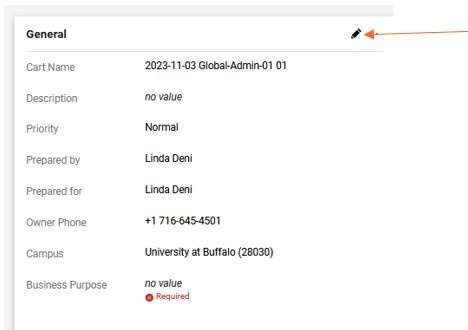
1. Go to the General Section
While checking out, click on Pencil icon in the General section of the order (Figure 1).
2. Select the Business Purpose Drop Down
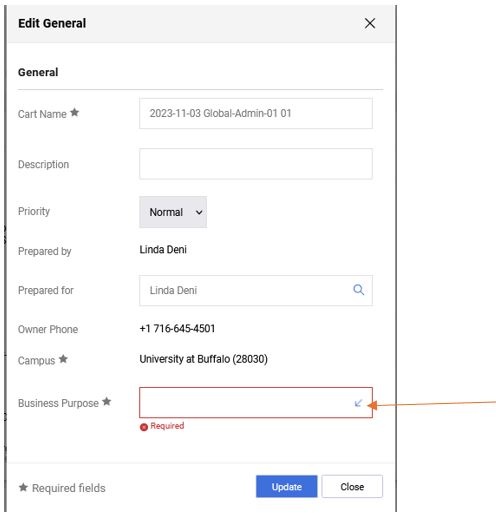
On the Edit General pop up screen, click the Arrow icon in Business Purpose box for drop down options (Figure 2).
3. Select the Business Purpose
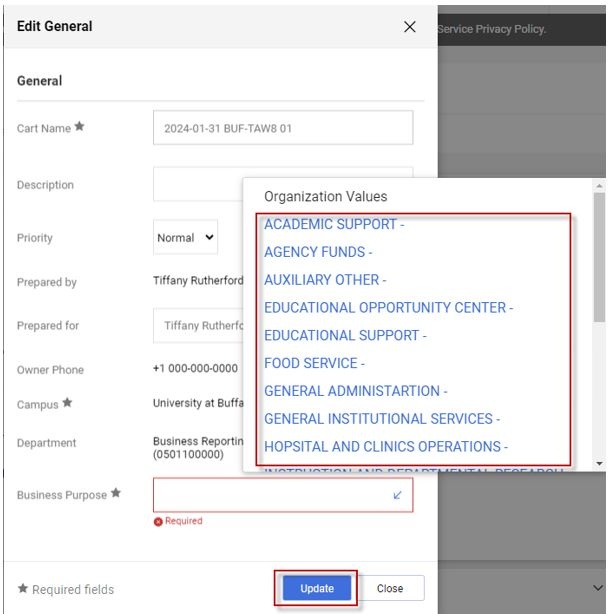
Select one business purpose option from the dropdown list and click Update (Figure 3).
Note: By selecting from the business purpose dropdown, a comment is no longer needs to be made for the business purpose.
Need help or have questions?
Visit our Business Services Support Hub to submit and track requests and access helpful resources.