Minitab
Minitab is an all-in-one statistical and graphical analysis software package. Minitab is easy to use and can be utilized interactively to provide data manipulation and statistical analysis for data sets.
Ways to use
Download from Minitab
Eligibility
Minitab is available to:
- UB Students who have paid the Comprehensive fee
- UB Faculty
- UB Geographic Full time Faculty
Download Minitab
Last updated: 9/22/2026
- Using a web browser, open https://licensing.minitab.com
- Enter your UB email address and click Next
- Select Buffalo Univ from the drop-down menu and click LOG IN
- If prompted, enter your UBITName and UBITName Password in their respective fields, then click Log In
- Under My Products, click Minitab Solution
- Select Download Desktop App and click Save File
- Click Done
Install Minitab
You must be your computer's administrator to install this software.
- From your Downloads, right-click the minitab .exe file and click Run as Administrator.
- Click Activate with a license and select Sign In.
- Make sure the installation location is set to: C:\Program Files\Minitab\MinitabXX (where XX is the version of Minitab you downlaoded)
- Launch Minitab from the desktop shortcut or start menu.
Important Installation Notes
If you accidentally created a free trial of Minitab using your UB email address, you may see two choices at sign in.

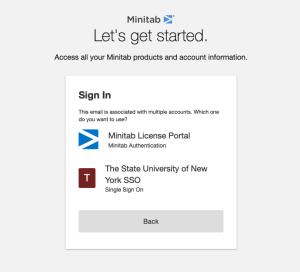
Always choose The State University of New York SSO.
If you signed into the first choice, Minitab License Portal (a free trial version), and created files, save any files created with that option to your device. Make sure you always choose The State University of New York SSO in the future.
Use in Computing Sites
- Available on any PC station and select computing stations
Use in My Virtual Public Site
Use in My Virtual Computing Lab
Help and Tutorials
Need more help with technology at UB?
Contact the UBIT Help Center.