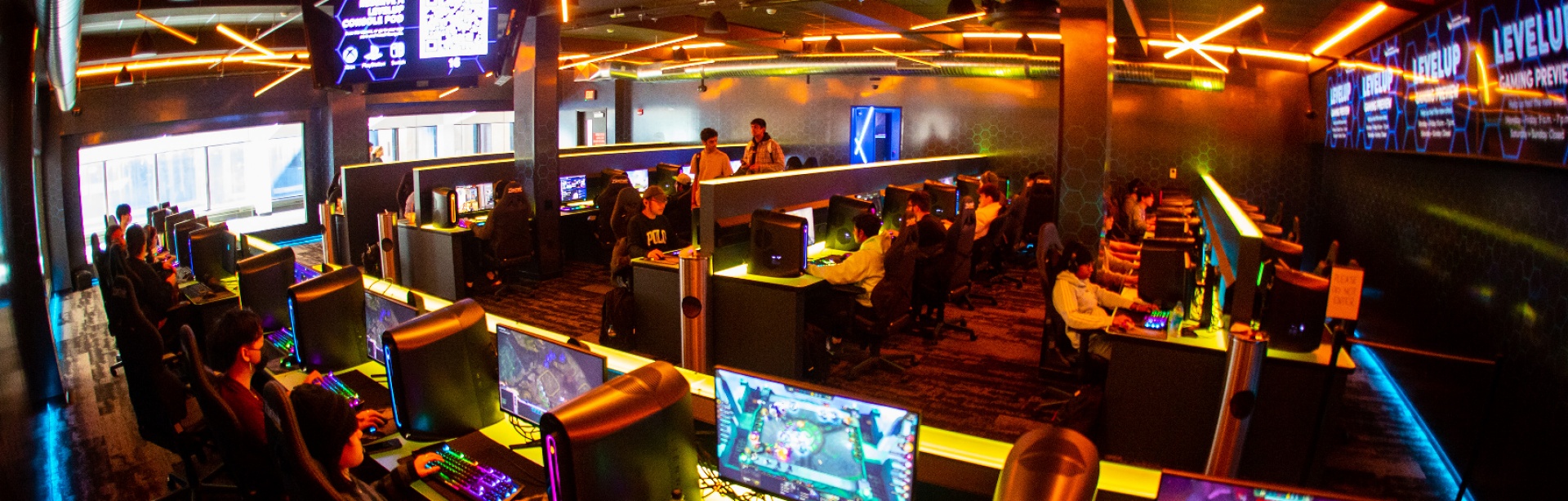
Level Up
2nd floor, Lockwood Memorial Library (North), North Campus
Hours
All hours are Eastern Time. Hours subject to change.
Monday, August 24 - Wednesday, December 16*
| Day | Opens | Closes |
|---|---|---|
| Monday | 9 a.m. | 11 p.m. |
| Tuesday | 9 a.m. | 11 p.m. |
| Wednesday | 9 a.m. | 11 p.m. |
| Thursday | 9 a.m. | 11 p.m. |
| Friday | 9 a.m. | 11 p.m. |
| Saturday | Noon | 11 p.m. |
| Sunday | Noon | 11 p.m. |
*Holidays/Exceptions:
Tuesday, September 1: Esports Arena open 11 a.m. - 11 p.m.
Monday, September 7: Closed
Friday, September 11: 1 p.m. - 11 p.m.
Monday, October 12: Closed
Tuesday, October 13: Closed
Thursday, November 26: Closed
Friday, November 27: Closed
Esports Arena

Alienware gaming PC and monitor in the Esports Arena. Photo by Sam Petty.
About
The Esports Arena features 52 Alienware Aurora 2026 gaming PCs with Intel Ultra 9 285k processors, Nvidia GeForce RTX 5080 graphics cards, and 32GB of DDR5 RAM, with 25-inch 1080p 320hz computer monitors and a four screen Jumbotron. Six of the Alienware gaming PCs are reserved for the varsity Esports team. You may spend a maximum of 15 hours per week of game time in the Esports Arena. Gaming PCs in the Esports Arena are available on a first come first served basis. A Charge + Lock charging station is located inside the Esports Arena.
Title | Platform |
|---|---|
7 Days to Die | Steam |
A Way Out | Steam |
Age of Empires: Definitive Edition | Steam |
Aim Lab | Steam |
Among Us | Steam, Epic |
Apex Legends | Steam |
ARK: Survival Evolved | Steam, Epic |
Assassin's Creed Chronicles: Russia | Steam |
Assassin's Creed II | Steam, Uplay |
| Assassin's Creed III | Uplay |
| Assassin's Creed Odyssey | Steam |
Assassin's Creed Origins | Uplay |
| Assassin's Creed Revelations | Steam |
Assassin's Creed Rogue | Steam |
Assassin's Creed Unity | Uplay |
Assassin's Creed Valhalla | Epic, Uplay |
| Assassin's Creed: Black Flag | Steam, Uplay |
Assassin's Creed: Brotherhood | Steam |
| Assassin's Creed: Freedom Cry | Uplay |
Battlefield 1 | Steam |
Brawlhalla | Steam, Uplay |
Call of Duty: Black Ops | Steam |
Call of Duty: Modern Warfare | Steam, Battle.net |
Call of Duty: Modern Warfare II | Steam, Battle.net |
Call of Duty: Vanguard | Battle.net |
Counter-Strike 2 | Steam |
Dead by Daylight | Steam, Epic |
Destiny 2 | Steam, Epic |
Diablo III | Battle.net |
Dota 2 | Steam |
Dota Underlords | Steam |
Escape From Tarkov | Battlestate |
ESEA | Steam |
Fall Guys | Steam, Epic |
FIFA 22 | Steam, EADesktop |
Final Fantasy XIV | Steam |
Fortnite | Epic |
Genshin Impact | Epic |
GUILTY GEAR -STRIVE- | Steam |
Hearthstone | Battle.net |
Hell Let Loose | Steam |
HELLDIVERS™ 2 | Steam |
Heroes of the Storm | Battle.net |
League of Legends | Riot |
Left 4 Dead 2 | Steam |
Lethal Company | Steam |
Lost Ark | Steam |
MapleStory | Steam |
Minecraft | Microsoft Store |
NARAKA: BLADEPOINT | Steam |
New World | Steam |
Omega Strikers | Steam |
Overwatch 2 | Battle.net |
Paladins | Steam |
Palworld | Steam |
Path of Exile | Steam |
PlayerUnknown's Battlegrounds (PUBG) | Steam, Epic |
Rainbow Six Siege | Steam |
Roblox | N/A |
Rocket League | Steam, Epic |
RuneScape | Steam |
Sid Meier's Civilization VI | Steam, Epic |
Smite | Steam |
Splitgate | Steam |
StarCraft II | Battle.net |
Stardew Valley | Steam |
Team Fortress 2 | Steam |
Teamfight Tactics (TFT) | Riot |
Valorant | Riot |
War Thunder | Steam |
Warframe | Steam |
World of Tanks | Steam |
World of Warcraft | Battle.net |
| World of Warcraft Classic | Battle.net |
Console Lounge

Console pods feature TVs with HDR graphics. Photo by Doug Levere.
About
There are 8 console pods, available by reservation only. Each contains Xbox Series X, Sony PlayStation 5, Nintendo Switch 2 and the ability to hook up your own retro gaming console. You may make a maximum of one appointment per day in the console pods.
- ASTRO's PlayRoom
- Demon's Souls
- FIFA 23
- Ghost of Tsushima
- God of War (2018)
- Gran Turismo 7
- Marvel's Spider-Man: Miles Morales
- NBA 2K23
- Nier: Automata
- Mario Kart 8
- Mario Kart World
- Super Mario Party
- Super Smash Bros. Ultimate
Common Questions
Do I need a reservation to play games?
The Esports Arena (the big room with Alienware PCs) does not require a reservation. The eight console pods can be reserved via UB Navigate or by installing the Navigate app on your smartphone.
What do I need to log in?
You must log in using your complete @buffalo.edu email address and your UBITName password. You also need to use Duo two-step verification.
How can I learn more about Esports at UB?
Check out Student Life's information about Esports and the UB Student Gaming Association.
Can I suggest a game title?
Sure! Suggest a game for Level Up.
What is your policy for fines and damages?
- UB students will be charged full replacement costs for equipment that is not returned or not returned in working order.
- Fees for equipment damaged, stolen, or lost based on current replacement cost.
- Students will be billed through Student Accounts and the student account will be blocked until payment is received in full.
- Privileges for use of space will be suspended until payment is received in full.
Map
Gaming PC usage is limited to 15 hours per week.
Need more help with technology at UB?
Contact the UBIT Help Center.