UB SharePoint
UB faculty and staff may use UB SharePoint to create an "intranet" for a department, project or service. Only people who have been granted access by the Site Owner will be able to view the site. SharePoint sites are not intended for instructional use.
On this page:
Getting Help
Requesting a SharePoint Site Collection
To request a SharePoint site, have your IT support node fill out the SharePoint Site Request Form and provide answers to the following questions:
- Is this SharePoint Site Collection for UB-authenticated people only?
- Will this Site Collection be used in any way for instructional use?
- What school or division does this Site Collection belong in?
- What will the name of the Site Collection be? (Please avoid spaces; use underscores or hyphens instead.)
- How much space do you need for this Site Collection? Most Site Collections start at 500MB. It can always be increased later with an EIS request (subject to approval)
- What UBITName would you like to designate as the Site Collection Administrator? This is the account that will have full control over the Site Collection. You can add more accounts later.
- Will the site contain any PHI or HIPAA data? (Yes/No)
- Will the site contain CUI data governed by NIST 800.171? (Yes/No)
- Will the site contain any other sensitive data? (Yes/No)
SharePoint Lifecycle Management
To ensure that SharePoint sites are current and meet governance requirements, site owners and administrators will receive periodic emails from M365 asking them to certify their sites and/or adjust settings.
Site Attestation
Site owners and administrators are expected to review site details every 12 months. When a site is due for review, owners and administrators will receive an email asking them to attest that site settings are accurate. If site owners or administrators do not complete attestation, subsequent emails will be sent each month.
When you receive the site attestation email, please confirm the following settings are accurate and then click the link in the email to attest:
- Site name
- Owners, members, and visitors
If you are no longer an appropriate owner, please transfer site ownership to the responsible party or work with your distributed IT support to transfer ownership.

Inactive Sites
Site owners and administrators will receive a monthly email if their site has been inactive for 6 months or more. If the site is not either certified or deleted after three notifications, the site will be put in read-only mode.
UBIT will conduct a yearly review of sites in read-only mode and work with distributed IT to confirm whether the site can be deleted.

Site Ownership
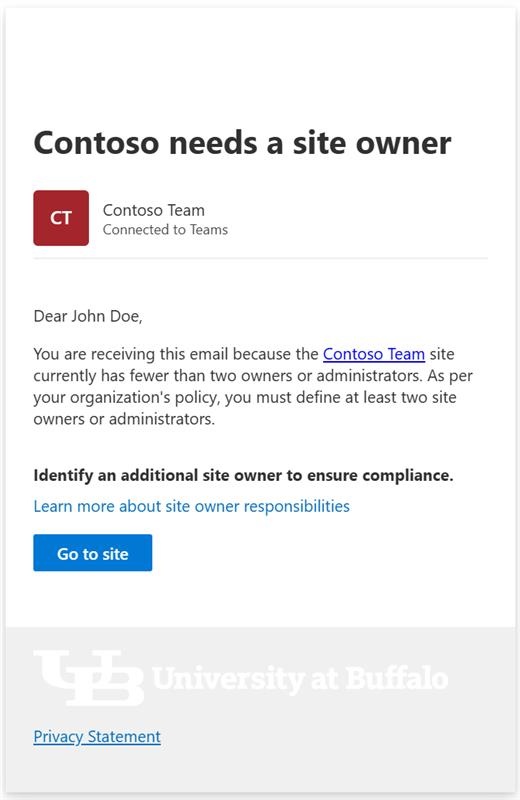
Each site must have at least two owners or administrators defined. If a site is found to be non-compliant, monthly notifications are sent to find a site owner or admin. If a site is non-compliant beyond 3 months, email notifications pause for a 3 month period and then start again.
Need more help with technology at UB?
Contact the UBIT Help Center.