Grade Changes
Grades may be changed to correct an error, or as the result of re-evaluation.
Timing and Deadlines
- Faculty can change grades via their HUB Faculty Center until the day after grades are due for that term.
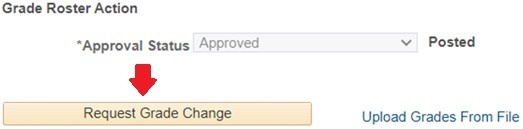
- This can be done within the grade roster by selecting the "Request Grade Change" button, select the revised grade for the applicable student(s), and click Save.
- Grade changes submitted after the grade change deadline must be submitted via the electronic grade change tool.
Important Dates: See the Information for Faculty Page
Post Access in HUB Required
The electronic request can only be submitted by any faculty or staff member with Post access in HUB for the course in question. Please consult with your department scheduler if assistance is needed with your grading access.
Allow Three Business Days for Processing
The request will automatically be routed to individuals within your department for necessary approvals, and then to the Office of the Registrar for processing. You can expect to see the grade change processed within three business days of the request being received by the Office of the Registrar.
Faculty No Longer Associated with UB or No Longer Available
Grade changes for courses taught by faculty who are no longer associated with UB, and are no longer available, may be submitted by officers of the units offering the courses in accordance with this policy, and must be fully explained and justified.
Grade Change Tool Instructions
This Option Is Available for Department Chairs and Academic Deans Only.
1. Navigate to the electronic grade change form, and log in with your UBIT name and password.
2. Click Add/Remove Delegates.

3. Enter the UBIT name of the delegate and click “Submit”.
You may add multiple delegates, but they must be added one at a time.

4. To remove a delegate, select the appropriate delegate and click the “Delete” button.
Optional: Click the Enable Silent Mode Button to Engage the Silent Mode Option.
When in silent mode only delegates will receive email notifications from the tool. You may still log into the tool at any time to see any outstanding requests requiring your approval or to review any requests previously reviewed by your delegates.
1. You will receive an email notifying you that a grade change request requires your review. Follow the link in the email.
2. Look at the “Pending Grade Change Requests” area.
3. Click “Show Details.”

4. Review the details of the request.
You have the option to select “Approve” or “Return to submitter.”
- If approved, the request will be sent for processing. The faculty member will be notified of the approval.
- If you choose to “Return to submitter,” you will be prompted to add a reason for returning the request to the submitter. Once comments are added, click “Return to submitter.”

1. Navigate to the electronic grade change form, and log in with your UBIT name and password.
2. Click “Submit Grade Change Request”.

3. Identify the section of the course that requires a grade change. Click the “Make Grade Changes” button.

Grade Changes Must Be Submitted in Accordance with the Deadlines Outlined in the Grade Change Policy
If you are submitting a grade change outside of these deadlines, you must include justification.
4. Submit the grade change request.
- Select the new grade for the relevant student(s). You can use the search bar to identify a student quickly.
- Enter a justification for the grade change.
- If the old grade was “I” or Blank, no justification is required.
- If the old grade was not “I” or Blank, enter a justification for the grade change that complies with the grade change policy. Upload supporting documentation if necessary. If you are requesting a grade change for multiple students, include a justification addressing the changes for all students.
- If the grade change exceeds the time limits noted in the policy, enter a justification for the timing of the request.
- The request approvers will default to the Department Chair and Cognizant Dean we have on file. If there has been a change in Department Chair or Cognizant Dean, you may enter the UBIT name of the individual who should review your request.

Features of the grade change request dashboard.
On the requests page, you will see a grid of all grade changes you have submitted.
- Pending and processed requests will appear in separate lists.
- The status column shows which step is pending. If the status is Registrar, it indicates all necessary signatures have been received and it is awaiting processing by the Registrar’s Office.
- To view the details of the request, including student name and grade change requested, click the green “Show Details” button.
- You can export the full list for your records in CSV or Excel format. To do so, click the corresponding button for the list you are attempting to download.
- The search functionality can be used to search any field on the dashboard. If the information you want to search for (e.g., Person Number) does not appear on the dashboard, it cannot be found using the search function. The Pending Grade Change Requests list and the Processed Grade Change Requests list must be searched separately.

